
Hardwood Spades - Card Game
Silver Creek EntertainmentCard
4.52.66K Reviews
- Version
- 2.0.635.0
- Installs
- 500.00K
- Age Rating
- Teen
Screenshots



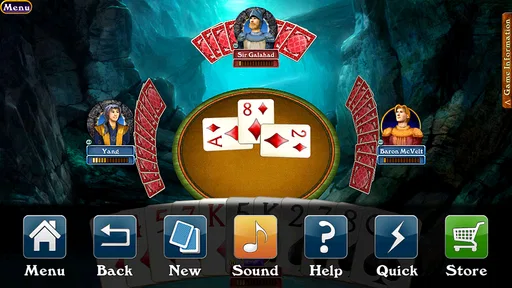
Our Review of Hardwood Spades - Card Game
 Analysis by Appyee
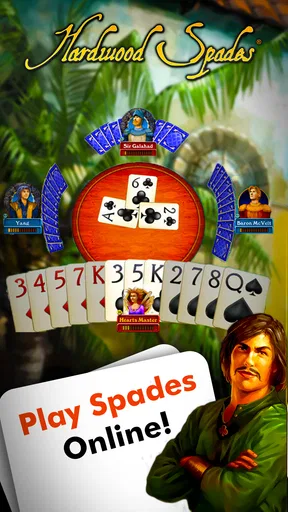
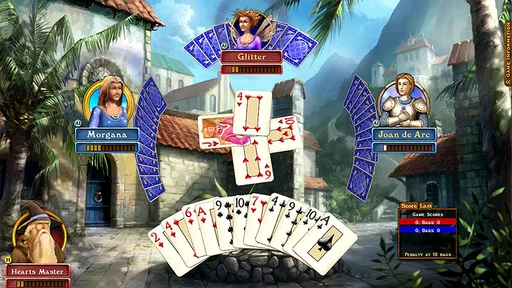
I spent time with Hardwood Spades as a straightforward way to play the classic card game on mobile, and its appeal became clear quickly: it keeps the focus on making bids, tracking tricks, and reading the table rather than surrounding the match with casino-style distractions. That makes it a particularly good fit for players who want a focused card game they can open for a few hands without learning a complicated interface first.
This is a free card game from Silver Creek Entertainment, with optional in-app purchases ranging from $0.99 to $99.99 per item. It is rated Teen, and the Android version requires Android 7.0 or later. The current version is 2.0.635.0, while the game itself first appeared on December 19, 2011. Those details matter less than the way it feels in use, but they help set expectations: this is an established mobile card title, not a brand-new experiment built around flashy presentation.
How Hardwood Spades feels in everyday play
I find the everyday appeal of Hardwood Spades comes from having a clear decision to make at each turn, rather than a stream of distractions to manage. It suits the small pockets of time when I can give a hand my attention, though a close match can make it tempting to stay for one more. That balance leads naturally to how the game’s turn-by-turn feedback shapes the experience.
A quick start with very little performance drama
My first impression was that the game is designed to get out of the way. Spades is already familiar to many card players, so the main challenge is not understanding a new world or managing a large collection of cards. You are there to choose a bid, play each trick carefully, and see whether your team can meet its target. That narrow purpose gives the app a naturally brisk rhythm.
Perceived speed is especially important in a card game. A long pause between turns can make a simple hand feel tiring, while a clean transition keeps your attention on the cards. Hardwood Spades benefits from having a relatively contained game loop. There are no sprawling maps, elaborate menus, or large inventories competing for attention. In my experience, that makes it feel lighter than many modern mobile games, even when I play several hands in one sitting.
I would not choose it because I expect a visually extravagant production. The presentation is more functional than spectacular, and that is a sensible trade-off here. The table, cards, and turn information need to remain readable; they do not need to imitate a console game. If your priority is a fast route into a traditional trick-taking match, the restrained approach works in its favor.
A useful habit is to treat the opening moments of every hand as planning time rather than tapping time. Before playing a card, I look at the bid, consider how many likely tricks my hand can produce, and remember that spades change the value of otherwise ordinary cards. That small pause improves the experience because the game rewards decisions more than reflexes. It also makes the app feel more substantial than a casual card toy.
What happens during longer or heavier sessions
The most demanding use case is not a single hand; it is a longer session in which I keep playing after a close result. That is when small interface annoyances become easier to notice. A game can appear perfectly smooth for a few minutes and still become less comfortable when the screen is repeatedly tapped, the match is interrupted, or attention shifts between the cards and the score.
Hardwood Spades is best approached as a focused session game. I can imagine using it during a commute, while waiting for an appointment, or in the evening when I want something more thoughtful than a quick puzzle but less involved than a large strategy title. The individual decisions are compact, yet a complete match can encourage me to continue because every hand creates a new problem: protect a high card, avoid overbidding, or decide when a low spade is more useful than a seemingly safer suit card.
One practical tip is to avoid playing too quickly after a successful trick. Winning one trick can tempt me to assume the rest of the hand is under control, but the remaining suits and the timing of spades still matter. Taking a moment to reconstruct what has already been played helps reduce careless moves. This is one of the app’s strengths: it gives experienced players room to improve without requiring a complicated progression system.
Heavy use also exposes the difference between a game that is pleasant for short bursts and one that is comfortable for extended play. If I am playing for a long period, I prefer a larger screen because card information and controls are easier to inspect without crowding. On a small phone, the game remains more suitable for deliberate play than for hurried one-handed tapping. That is not a serious flaw, but it affects which device I would choose for a full evening session.
Reliability is more than opening the app
For a card game, reliability means more than launching successfully. It also means that I can follow whose turn it is, understand the result of a trick, and recover mentally when I return after a distraction. Hardwood Spades has an advantage here because its central rules are familiar and its purpose is narrow. I am not trying to remember a dozen currencies, character abilities, or temporary effects before I can resume.
That simplicity makes interruptions less intimidating. If I put the phone down to answer a message or speak to someone, I can usually return to the match by checking the current hand and the cards already played. The game does not ask me to maintain a large amount of unrelated information. For everyday use, that makes it more dependable as a casual companion than many feature-heavy alternatives.
Still, a traditional card game depends heavily on clarity. If you are new to Spades, the app may not remove every part of the learning curve for you. You need to understand bidding, trick-taking, the role of spades, and the consequences of failing to meet a bid. I recommend learning the basic rules before expecting the first few matches to feel effortless. The game is easier to appreciate once you can judge whether a decision was genuinely clever or simply lucky.
Another reliability issue is human rather than technical: the quality of a match depends on the opponents and the pace of play. A player who enjoys analyzing hands will get more from the game than someone who wants constant novelty. The app’s focused design is a benefit when I want concentration, but it can feel repetitive if I need new modes, dramatic rewards, or frequent visual changes to stay engaged.
Why its multiplayer focus changes the experience
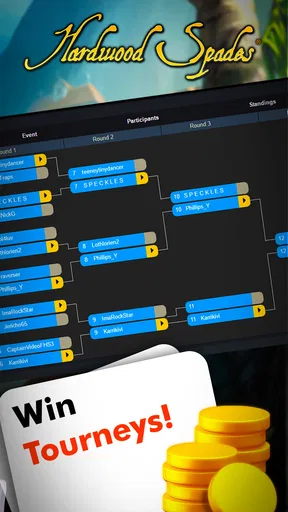
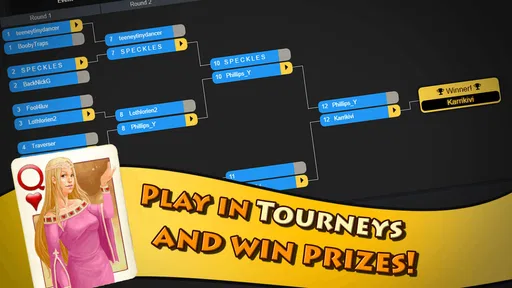
The strongest identity of this title comes from its emphasis on multiplayer Spades. That places it closer to a digital card table than to a solo arcade game. The difference is important. In a typical solitaire alternative, I am mainly solving a layout created for one person. Here, the tension comes from bids, partnerships, and the uncertainty of what other players may hold.
That makes it a good choice for someone who wants skill-based competition without casino framing. I do not need to think about betting money or managing a simulated gambling economy to enjoy the match. The meaningful resource is information: which suits have been exhausted, which high cards may remain, and whether the table’s bidding tells me something about the other hands.
Compared with a physical deck, the app is more convenient and less social in a face-to-face sense. I can play without finding three other people, shuffling cards, or keeping score manually. The trade-off is that a phone screen does not replace the conversation and personality of a real table. If the main reason you enjoy Spades is the banter around a kitchen table, a physical deck or a group-focused alternative may still be better.
Compared with broad mobile card collections, Hardwood Spades is more specialized. A collection app may offer solitaire, hearts, freecell, poker, and other formats, making it a better pick for variety. This game makes more sense when Spades itself is the reason you are downloading it. Its narrower scope is not something I would try to disguise; it is exactly why the experience feels more coherent.
Device limits and practical expectations
The Android requirement is relatively accommodating for people using older compatible devices, since the game supports Android 7.0 and later. That does not guarantee identical comfort on every phone or tablet, though. Screen size, touch accuracy, display quality, and the age of the device can all change how easy it is to inspect cards and select a play.
I would install it on a modest device before assuming I need newer hardware. The game’s card-table format does not suggest the kind of visual workload associated with a large three-dimensional action game. In practical terms, that means it is a sensible candidate for an older Android phone that still handles ordinary apps well. The more relevant limitation is likely to be screen comfort rather than raw graphical demand.
On a compact display, I recommend slowing down and checking the selected card before confirming a move. That is especially useful when several cards are close together or when I am playing while distracted. A larger tablet can make the table easier to read, but it may also feel less convenient for short sessions. The best device depends on whether I value portability or a relaxed, almost tabletop-like view.
Storage and battery expectations also seem reasonable for this type of game, but I would avoid presenting that as a guarantee for every device. Older phones can behave differently depending on background apps, battery health, and system condition. My practical advice is simple: keep the operating system compatible, close unusually demanding background tasks if the phone is struggling, and judge the fit by readability as much as by loading behavior.
Where the free model fits
The game can be downloaded for free, which lowers the barrier to trying it. That is useful because Spades is a taste-specific experience: some players will immediately enjoy the careful bidding, while others will find the pace too measured. Being able to test the basic experience before spending anything is a meaningful advantage.
There are optional purchases priced from $0.99 to $99.99 per item. I would keep that range in mind before making a purchase, especially if I am downloading the game for a child or sharing a device. The Teen content rating is another reason to check the store and device settings that apply to your household. For my own use, the sensible approach is to start free, decide whether the multiplayer card experience has lasting value, and only then consider any optional spending.
The free entry also makes the app useful for introducing someone to digital Spades. I could recommend it to a friend who already knows the physical game and wants a convenient way to play away from home. I would be more cautious recommending it to someone who expects a completely free experience with no purchase prompts or to someone who dislikes any form of optional monetization.
Who should install it, and who should skip it
I would recommend Hardwood Spades to players who enjoy trick-taking strategy, want a dedicated Spades experience, and prefer a clean card-table focus over casino presentation. It is also a good match for people who want something that can fit into ordinary gaps in the day without demanding a long tutorial or a powerful gaming phone.
It is less suitable for anyone looking for a broad selection of card games in one download. If you regularly switch between solitaire, poker, blackjack, and collectible card battles, a larger card suite may provide better value. It may also disappoint players who need constant unlocks, animated spectacle, or a strong narrative reason to keep playing.
Newcomers should know that the game’s simplicity does not mean the strategy is shallow. A beginner can learn the mechanics quickly and still need time to understand good bidding. I would start conservatively, watch how many tricks each hand actually produces, and pay attention to when a partner’s bid changes the safest plan. That learning process is rewarding, but it is not the same as an instantly relaxing solitaire session.
My performance verdict after using it
Hardwood Spades succeeds because it keeps its priorities narrow. The game is free to try, built around multiplayer Spades, and developed by Silver Creek Entertainment. Its established presence is reflected in an average rating of 4.5 from around 9.1 thousand ratings, with more than 500 thousand installs. Those figures suggest a substantial audience, but my recommendation comes mainly from how well the focused format suits real use.
In normal play, I find it more convincing as a calm, decision-driven card game than as a flashy source of constant entertainment. It feels most at home in short breaks, relaxed evening sessions, and situations where I want to think without committing to a large game. Its resource demands appear modest for a card-table title, while the main comfort concerns are screen size, familiarity with Spades, and tolerance for repeating the same core format.
The limitations are clear enough to make the choice easier. It is not the best alternative for a player who wants many card genres, a social experience identical to sitting with friends, or a heavily animated presentation. The optional purchase range also deserves attention before anyone spends money. But for the right audience, those are manageable trade-offs rather than deal-breakers.
My honest recommendation is to try it if Spades is the game you actually want to play. Give yourself a few hands to adjust to the pace, resist rushing your bids, and use a larger screen when you plan a longer session. If you prefer focused multiplayer cards over casino gimmicks and do not need a huge collection of modes, this dedicated approach makes the app an easy one to keep available on an Android device.
Verdict
Strengths of Hardwood Spades - Card Game
- Clear card graphics make suits and ranks easy to read.
- Multiple difficulty levels suit both casual and experienced players.
- Offline play lets you enjoy matches without a data connection.
- Quick rounds work well for short gaming sessions.
- Simple controls make bidding and card play easy to learn.
Limitations of Hardwood Spades - Card Game
- Ads may interrupt play, especially between completed rounds.
- The single-player experience can feel repetitive over time.
- Advanced players may find the AI behavior predictable.
- Limited customization reduces variety in table and card designs.
- Some features may require in-app purchases or premium access.
Similar Picks in This Category
View All
Solitaire - Classic Card Games
MobilityWare4.6

UNO!™
Mattel163 Limited4.3

Spider Solitaire: Card Games
MobilityWare4.6

Solitaire.com - Classic Cards
Tripledot Studios Limited4.7

Plants vs. Zombies™ Heroes
ELECTRONIC ARTS4.1

Hearthstone
Blizzard Entertainment, Inc.4.1
Frequently Asked Questions
What is Hardwood Spades - Card Game?
Hardwood Spades - Card Game is a digital version of the classic four-player Spades trick-taking game. It lets you play against computer opponents or compete with other people online, depending on the available game modes. The app combines familiar Spades rules with customizable tables, card designs, avatars, and a polished visual presentation, making it suitable for both casual players and fans of traditional card games.
Can beginners learn how to play Spades in the app?
Yes. Hardwood Spades is generally approachable for new players because the basic objective is easy to understand: predict how many tricks your team will win and try to meet that bid. However, learning advanced strategy takes time, especially when deciding when to bid, save high cards, or support your partner. Beginners should start with practice games and pay attention to the scoring and bidding system.
Does Hardwood Spades support offline play?
The availability of offline play can depend on the version and platform, but the game is designed to provide computer-controlled opponents for practice and solo sessions. An internet connection is normally required for online multiplayer features, account-related services, advertisements, updates, or purchases. Before downloading, check the store description and permissions for your device if offline access is especially important to you.
Can I play Hardwood Spades with friends or other players online?
Hardwood Spades is built around multiplayer card-game entertainment and may allow you to join online tables, compete with other players, or invite friends, depending on the current version and service availability. Online play can require a stable connection and may use player accounts or platform services. Matchmaking quality and available tables can also vary by time, region, and the size of the active community.
Is Hardwood Spades free to download, and are there in-app purchases?
The game may be available as a free download or as a paid title depending on the platform, region, and current store listing. Some versions can include optional in-app purchases, premium features, cosmetic customization, advertising, or additional content. We recommend reviewing the Google Play or App Store page before installing, particularly if the device is used by children or if you want to avoid unexpected charges.
Play our best games!


